


What is Coherence?
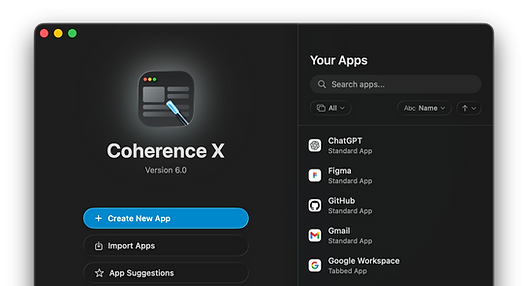
Coherence turns any website into a standalone Mac app that lives in your Dock and works the way you expect on macOS. Each app can have its own accounts, extensions, appearance, and link rules without the tabs and clutter of a regular browser.
Your app, ready in seconds
Building a Coherence app is effortless — and smarter than ever.
Just enter a URL, pick an icon, and give it a name. In seconds, your site becomes a polished, standalone app ready for your Mac.


Bring your browser
Import profiles, logins, bookmarks, and extensions


Customize every app
Give each app its own defaults, window behavior, and profiles
Smart Link Routing
Control where links open: in app, another app, or any browser

Web apps that belong on your Mac
Coherence apps install, launch independently, and organize the way Mac apps should. Drag them into your Dock, switch between them naturally, and see the correct app icon throughout macOS.
Standard Apps
The simplest way to turn a website into a true Mac app. Standard apps open in a single, distraction-free window that feels like it was designed for macOS — no extra toolbars, no clutter, just focus.



Tabbed Apps
Need the flexibility of a browser with the isolation and customization of a standalone app? Tabbed apps bring multiple pages together with full tab support — perfect for grouping related tools like Gmail, Calendar, and Drive into a single workspace.


Incognito Apps
For privacy-first tasks, Incognito apps launch in Chrome’s private browsing mode by default. No saved sessions, no history — just a clean, secure environment every time you open it.


Powered by the browser you choose
Coherence X6 supports the most popular Chromium-based browsers, giving you the same speed and compatibility, plus the ability to pick the experience that best matches your workflow or privacy needs.
.png)
.png)
.png)
.png)
.png)
.png)


Make every app your own
Coherence gives every app its own appearance, behavior, and browser setup. Its companion extension works silently in the background, while everything is installed and configured directly inside Coherence.
LINK ROUTING
Control exactly where every link opens. Create rules for specific websites and URLs, then keep links inside the app, send them to another Coherence app, open them in a particular browser, or use your default browser.

EXTENSIONS & PROFILES
Import extensions, profiles, settings, preferences, and history from your browser to your Coherence app so your ideal setup continues in a completely isolated new environment.

WINDOWS & SESSIONS
Decide how each app opens, restores, and manages its windows. Coherence can bring back your previous tabs, intelligently handle new windows, and reopen the right content when you click its Dock icon.


Even More to Love
Coherence X6 is packed with thoughtful tools to help you build, manage, and customize your apps with ease. From icon design to full app library control, everything's designed to give you power without complexity.


Loved by Power Users and Minimalists Alike
From designers to developers to everyday Mac users, people are switching to Coherence for a reason. Here’s what they’re saying.
Exactly what I was looking for! The benefit of Chromium PWAs (including extensions) without having to have the browser running in the dock.
J Ryan
Does exactly what it says it will do for Chrome apps, and make sure you pair it with their Safari version called Unite. I have been using them for a year to isolate specific web apps like Gmail, Google Voice, ChatGPT, and a lot of my self-hosted applications (Plex, TrueNAS, Proxmox, etc.)
Bruce
Overall very easy to create web apps and the documentation is good.
Kenji
Useful for those platforms that are only accessed through a web browser, the possibility of simulating a native application of the system, greatly improves the visualization as well as its use.
Luis Antonio González Padilla
This is a great app that works exactly as I hoped it would.
Brad Doble
yep this is great, allowed me to have my own apps for pocketcast player, and bible.com for listening to there audio players conveniently
Alistair Hutten
Perfect
Lumumba Mutumanje
I’ve been really happy with this app. It allows much more flexibility that just using chrome to install web apps.
yeetmasjien
The app is amazing. Couldn’t live without it.
Brett
My most used app
pablco
Definitely improved over the years and is now one of my daily use apps! Well, the apps that Coherence X allows me to create!
Santiago Arene
Makes working with web-apps like Office 365, Miro, Gmail, and others much easier by making them appear as their own apps, so I can ⌘+Tab between them. Unlike the “native” offerings (which are often just kiosk mode browsers) you can install extensions and ad blockers etc. Highly recommended.
Robert Meerman
Great way to make apps out of websites. I use this for google maps and facebook.
Bill Dimarelos
Coherence works reliably... it's a browser-based application as an app on the Mac – fantastic!
Anthony-James Owen
It works pretty well. It lets me put my work Gmail in a dedicated app so I can used my ⌘+tab muscle memory when switching between it and other apps It also lets me be logged into my personal gmail in Safari, keeping it separte from my work account. It also works with my USB Yubikey for multi-factor login, which is critical.
Santiago Arene
Best in class
Coherence is the most powerful, and most native, Chrome-based SSB tool
Coherence
WebCatalog
ToDesktop
Nativefier

Chrome extension support
-
-
-
Native macOS behaviors
limited
-
-
Curated app catalog
-
-
Tabbed apps
-
-
Incognito apps
-
-
-
Fully edit created apps
-
-
-
Icon customization tools
-
-
-
Link whitelisting
-
-
-
Share and export apps
-
-
-
Multiple browser engine choices
-
-
-

Get Coherence
The Most Powerful Way to Turn Websites Into Apps on your Mac.




Products


Learn
More
Retired Products

Copyright © 2026 BZG Apps LLC & Binyamin Goldman. All Rights Reserved.
